Documentation
How to use Whetstone, what happens underneath, and how to drive it from code.
1. User manual
A fine-tune is a job. It moves through a pipeline on its own and pauses at three gates, where a person decides. The dashboard's Needs your attention list shows every job waiting for you, with a Review button that opens the right screen.
Signing in (demo)
- Open the demo address you were given and enter the demo key (sent with your invitation).
- The key stays in this browser tab only and is sent with each request as a header — never in a web address.
- The demo is seeded with made-up companies in the project acme-pitches (demo): one fine-tune has already been shipped, and one is waiting at gate 1 for you.
Datasets & quality
Choose a project and drop a .jsonl file (one example per line, with fields such as
input/output and optionally group_id for the company or document it
belongs to). You'll see quality tiles, a length histogram, lint checks and the number review
queue.
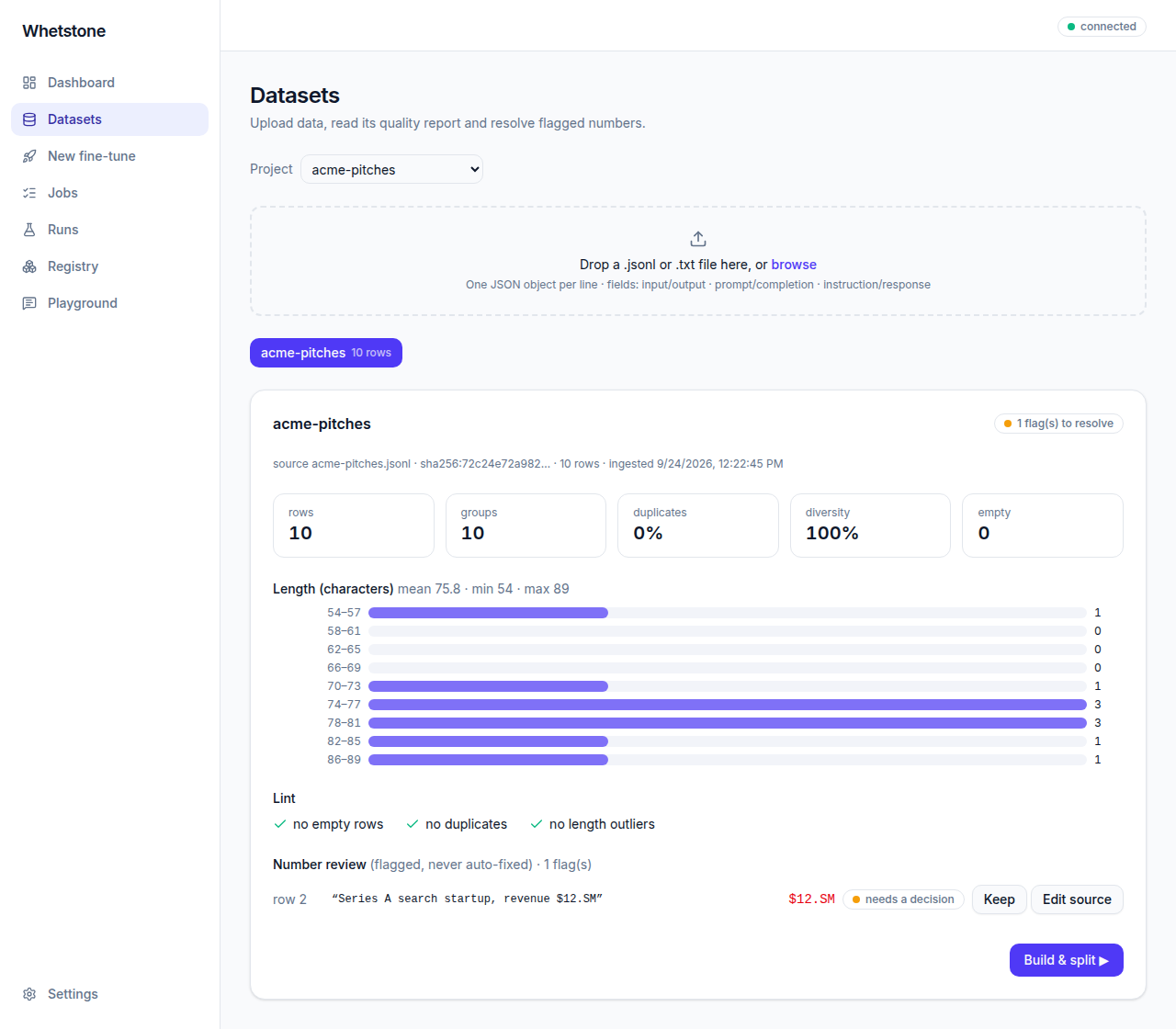
For each flagged number, choose Keep (it's correct) or Edit source (it's wrong; add a note). Whetstone never changes your file: a number marked for editing blocks gate 1 until a corrected file is uploaded. When you're ready, press Build & split.
Gate 1 · Build & split
Page through the examples exactly as the model will see them, and check the split into training, validation and test sets. Each company stays in one set, so the test can't be learned by heart.
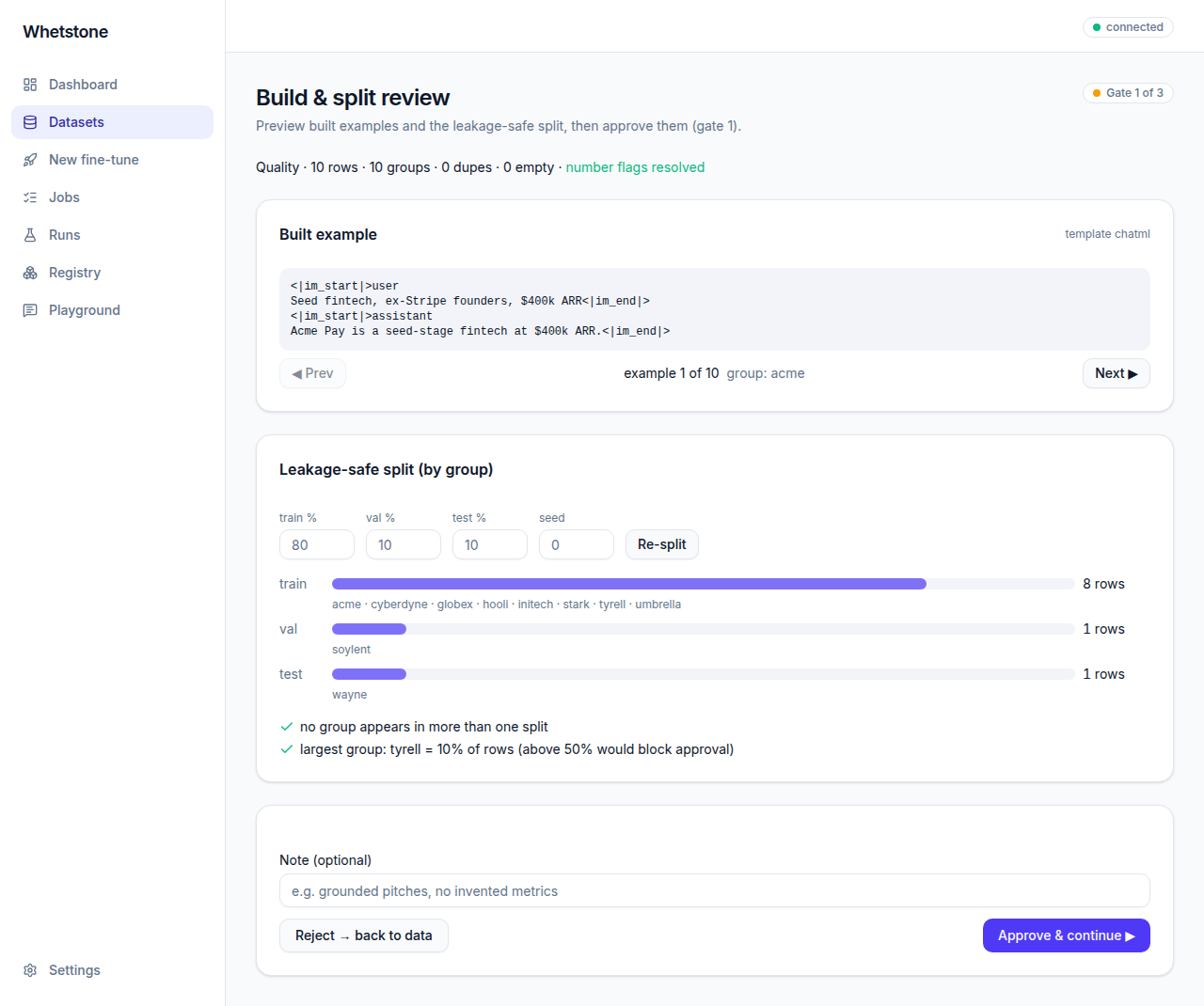
- Re-split with other percentages or a different seed — the job's split is replaced, so what you approve is what trains.
- Approve & continue is disabled while anything blocks it; the reasons are listed beside the button.
- Reject stops the job and records your note.
Gate 2 · New fine-tune
Four steps: Dataset (jobs that passed gate 1), Model & method, Compute and Review.
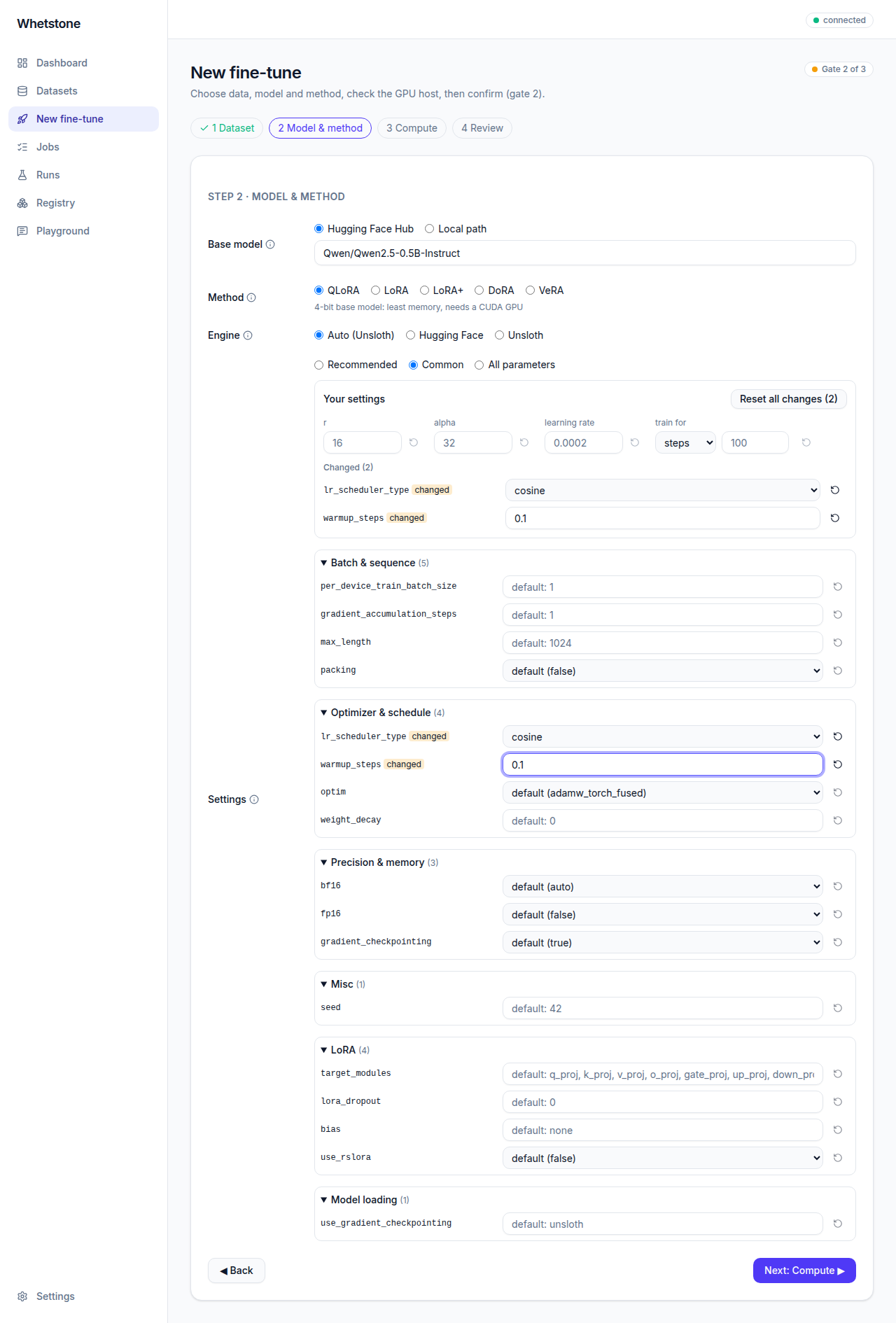
- Engine — Auto picks Unsloth when it supports the model and method (faster), otherwise Hugging Face. You can choose either explicitly.
- Settings — Recommended in one click; Common for the dozen settings most runs touch; All parameters for everything, grouped and searchable. Your settings keeps every change on top, each with a reset and an undo.
- Compute — a GPU check runs on the training host. Without a GPU, choose Dry-run on CPU instead.
- Review — a summary, the equivalent command line to copy, and a confirmation box. Start saves the settings and approves gate 2.
Watching a job
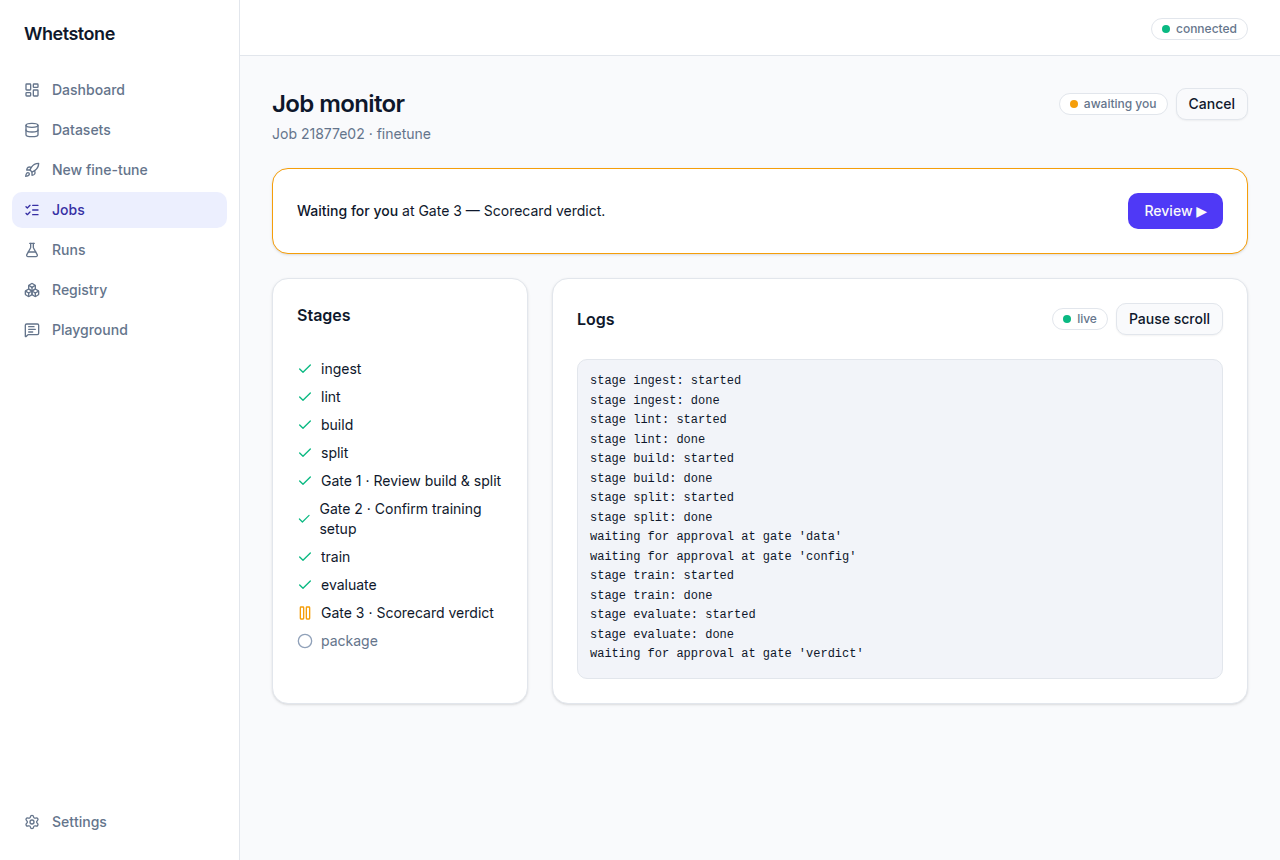
The job monitor shows the stages and a live log. If a stage fails, the error is translated into a fix where possible, and Retry from checkpoint resumes after the stages that already finished.
Gate 3 · Scorecard
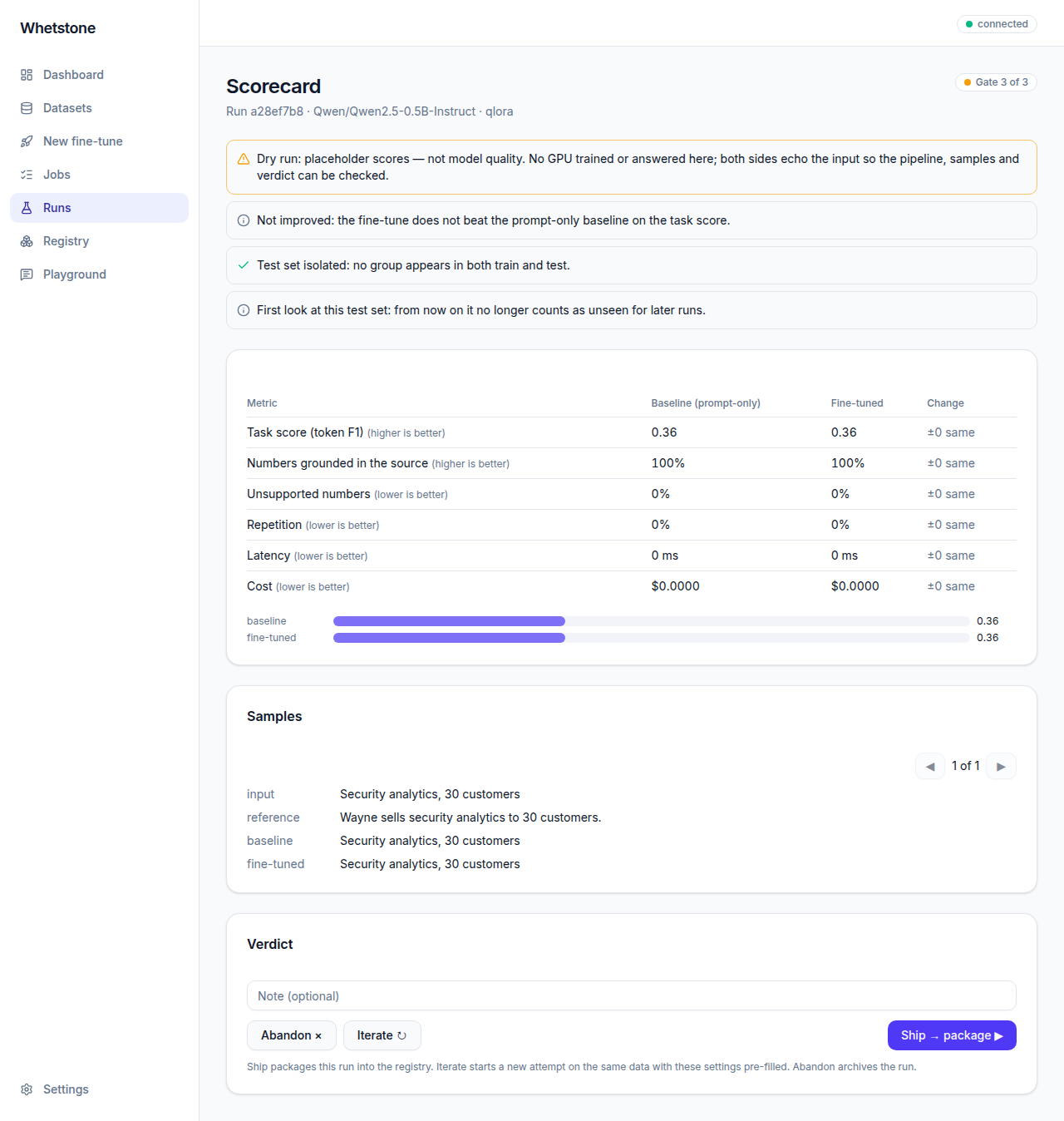
The fine-tune against its prompt-only baseline on the held-out test set. Each metric says whether higher or lower is better, and changes are coloured accordingly. Samples show both answers side by side, with numbers the model invented flagged. A notice appears once a test set has been looked at: later runs judged on it are no longer a fair comparison.
- Ship packages the run into the registry as the next version.
- Iterate starts a new attempt on the same data with these settings pre-filled.
- Abandon archives the run.
Registry & playground
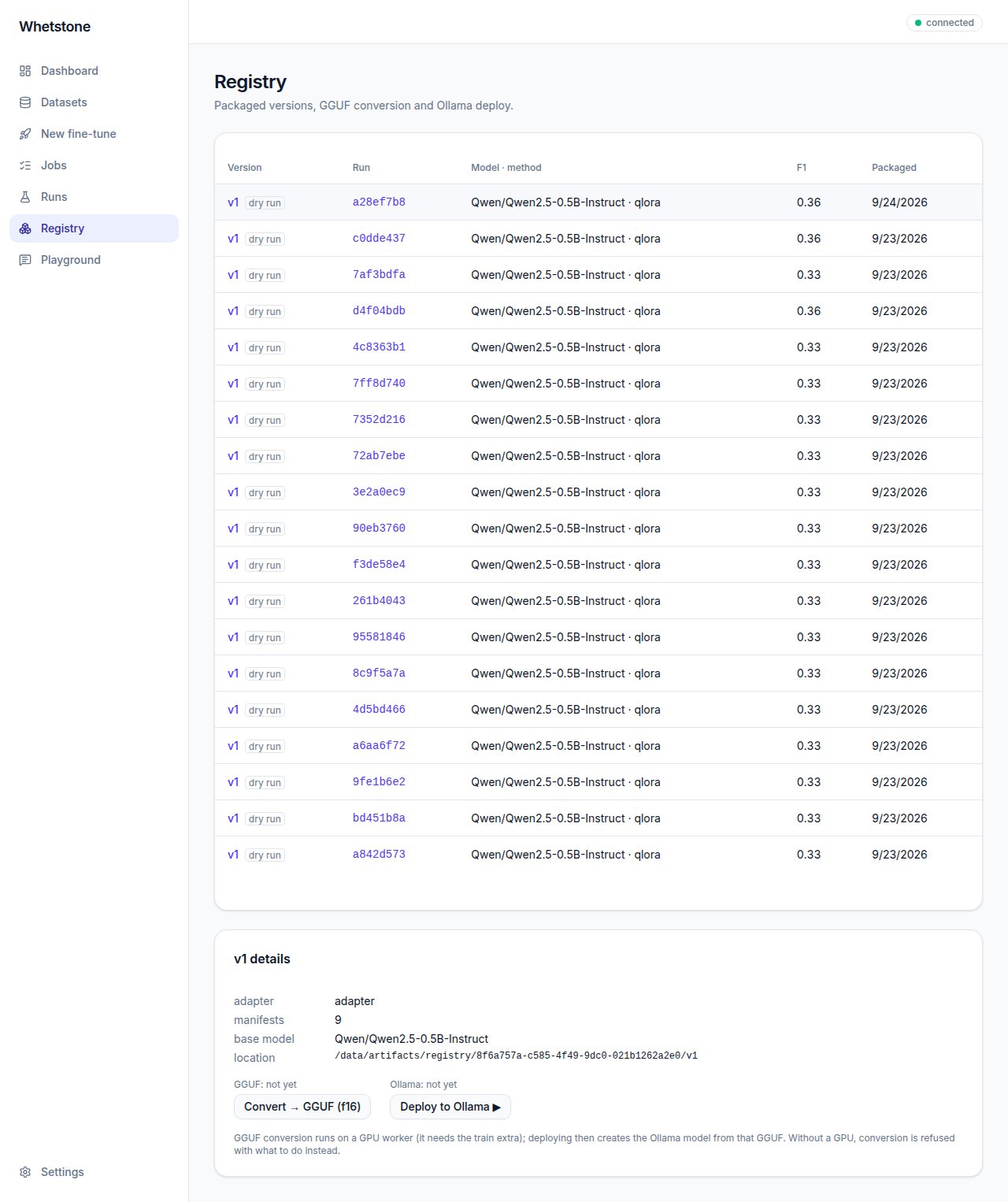
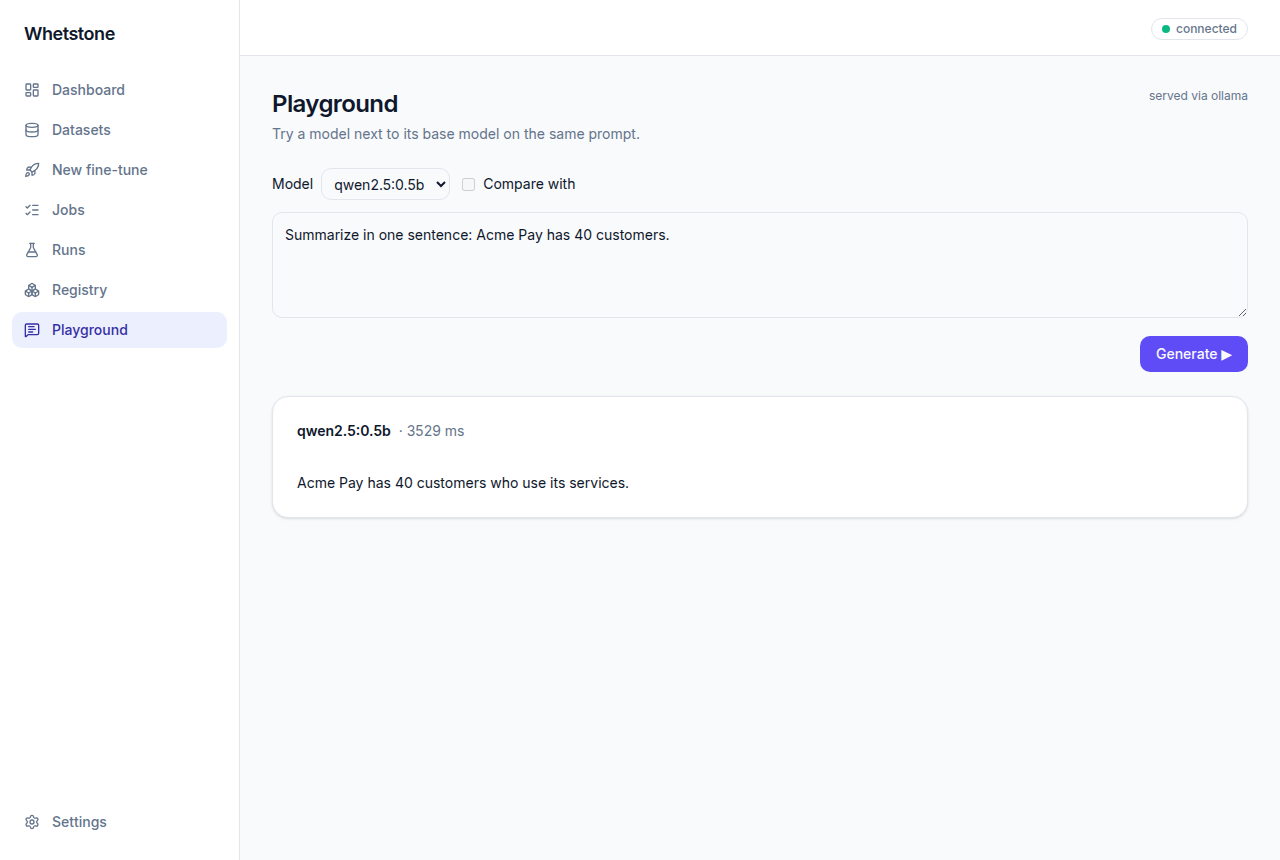
Each version records its adapter, base model and every stage record. Convert → GGUF and Deploy to Ollama need a GPU host; without one they say so. The Playground answers from any model the stack serves, optionally side by side.
2. A day in the life
An analyst on a pitch-writing team wants a small model that summarises startups the way the team writes — without inventing figures.
- 9:00 — Data. They upload 400 past pitch summaries. The report flags "$12.SM" in one row (a scanning error for $12.5M). They mark it Edit source, fix the source file, and upload it again. Everything is clean.
- 9:20 — Gate 1. Paging through the built examples, they notice one company makes up 60% of the rows; approval is blocked. They trim that company's examples, upload the file again, and build a new split. Approved.
- 9:35 — Gate 2. They pick a 0.5B Qwen model with QLoRA; Auto chooses Unsloth. Under Common they switch the scheduler to cosine and train for 2 epochs. The GPU check passes on the team's GPU box. They copy the equivalent command line into their notes, confirm, and start.
- 10:30 — Gate 3. The scorecard shows the task score up and invented numbers down against the prompt-only baseline. One sample still rounds a figure; they note it and ship — the registry now holds v1.
- 10:40 — Try it. After converting and deploying v1 on the GPU box, they compare it with the base model in the playground on a new pitch. The base model invents "40 hospital partners"; v1 doesn't.
Every decision above — who approved what, the notes, the exact settings — is recorded with the job.
3. Technical architecture
Components
| Service | Role |
|---|---|
web | nginx serving the single-page UI, proxying /api, sending security headers. |
api | FastAPI control plane: projects, datasets, jobs and gates, runs, registry, serving proxy. CPU only. |
worker | arq worker running pipeline stages and registry tasks; streams logs to Redis. |
postgres | Projects, datasets, jobs, runs, reviews, registry versions (Alembic migrations). |
redis | Job queue and per-job log streams (served to the browser as server-sent events). |
ollama | Model serving for the playground and deploys; models kept in a volume. |
| GPU host | Pinned worker images (Hugging Face or Unsloth engine) reached through the compute backends (on-premises Docker; RunPod). |
The pipeline
ingest → lint → build → split → [gate 1: data] → [gate 2: config] → train → evaluate → [gate 3: verdict] → package
Each stage reads the previous stage's output from the job's folder and writes its own, plus a manifest. A stage with a manifest is skipped on resume, so retries continue where they stopped. Gate decisions are manifests too. Approvals are atomic and locked, so two people approving at once can't run anything twice.
Parameters & validation
The list of training parameters is generated from the installed training libraries (trl's SFTConfig, peft's LoRA and VeRA configs, bitsandbytes, and Unsloth read from its source), with the library versions recorded. Parameters are grouped into trainer, peft and load, filtered by engine and method; secrets, multi-GPU options and settings the pipeline owns are never offered.
Settings are checked twice: at gate 2 against the list and a rules table (steps vs. epochs, one precision, evaluation needs a validation split, lengths within the model's context…), and again at the start of training by building the real library configs before any model is downloaded.
Reproducibility
- Every stage and decision writes a manifest: inputs (content hashes), tool versions, configuration.
- Only changed settings are stored, alongside the versions of the libraries that defined the defaults.
- Python dependencies are locked; the UI's are pinned exactly; worker images pin the training libraries.
Security
- One API key per deployment; the UI keeps it in the tab's session storage and sends it only as the
X-API-Keyheader. A log scan in the test suite proves it never appears in any log. - nginx sends a strict Content-Security-Policy (no inline scripts or eval),
X-Frame-Options: DENY,Referrer-Policy: no-referrerandnosniff. - Uploads are size-capped, encoding-checked and stored under random names; model configs are read only from the configured models folder.
- Secrets such as the Hugging Face token stay in server environment variables and never reach the browser.
4. API reference
Base path /api behind the web front (the API itself listens on port 8000 on localhost).
Every request needs the X-API-Key header. The full schema is served at
/api/openapi.json.
| Endpoint | Purpose |
|---|---|
GET/POST /projects | List or create projects |
POST /datasets | Upload a JSON Lines file (multipart: file, project_id) |
GET /datasets, /datasets/{id} | List or read datasets |
GET /datasets/{id}/report | Quality report, lint, length bins, flagged numbers |
POST /datasets/{id}/numbers/{row} | Keep or edit-source decision on a flagged number |
POST /datasets/{id}/build, /split | Preview built examples and a split |
GET/POST /jobs | List (filters: status, gate, project, dataset) or create a job |
GET /jobs/{id}, /stages, /split | A job, its pipeline stages, its split |
GET /jobs/{id}/logs | Live log as server-sent events (resumable with Last-Event-ID) |
POST /jobs/{id}/approve, /reject | Decide gates 1 and 2 |
POST /jobs/{id}/resplit | Replace the job's split (at gate 1) |
PUT /jobs/{id}/config | Set the training configuration (at gate 2) |
POST /jobs/{id}/dry-run | Try settings on the CPU placeholder engine |
POST /jobs/{id}/cancel, /retry | Cancel, or retry from the last checkpoint |
GET /runs, /runs/{id} | Runs (filters and sort) and a run's scorecard |
POST /runs/{id}/verdict | Gate 3: ship, iterate or abandon |
PUT /runs/baseline | Pin a project's baseline run |
GET /runs/metrics | Each metric and which direction is better |
GET /registry, /registry/{id} | Packaged versions |
POST /registry/{id}/gguf, /deploy | Queue GGUF conversion or an Ollama deploy (GPU host) |
GET /models, /engine, /preflight | Base models, engine choice, GPU check |
GET /train-params | Every parameter for a model, method and engine |
GET /serve/models, POST /serve/{model}/generate | Served models; a completion with latency and invented-number flags |
GET /healthz, /metrics | Liveness and job counts |
curl -H "X-API-Key: $WHET_API_KEY" http://localhost:8080/api/jobs?status=awaiting_approval5. Command line
export WHET_API_URL=http://localhost:8080/api WHET_API_KEY=<key>
whet project create demo
whet job create <project-id>
whet data report data.jsonl           # quality report, locally
whet params Qwen/Qwen2.5-0.5B-Instruct --method qlora [--all]
whet train Qwen/Qwen2.5-0.5B-Instruct data.jsonl --method qlora --max-steps 100 \
    --set trainer.lr_scheduler_type=cosine --set trainer.warmup_steps=0.1 \
    [--config train.yaml] [--eval-dataset val.jsonl] [--dry-run]
whet package ./run --version v1 --out ./registrywhet train command for the settings on
screen, including every changed parameter as --set.6. Configuration
| Variable | Purpose |
|---|---|
WHET_API_KEY | The key the server accepts (required) |
WHET_DATABASE_URL, WHET_REDIS_URL | Database and queue (set by the stack) |
WHET_HF_TOKEN | Hugging Face token for gated models (server only) |
WHET_MAX_UPLOAD_MB | Largest upload (default 50) |
WHET_OLLAMA_MODEL | Model the stack serves by default (default qwen2.5:0.5b) |
WHET_OLLAMA_HOST | Serving backend (default: the stack's Ollama) |
WHET_HOST_ARTIFACT_DIR | Artifacts folder on the Docker host, for GPU task containers |
Local base models go in ./data/models, one folder per model with its config.json.
7. Known limits
- Real training, GGUF conversion and deploys need an NVIDIA GPU host; they have been built and tested without one, and a first GPU validation run is next on the roadmap.
- One deployment, one key: multi-user accounts and sign-in are on the roadmap.
- Budget and runtime limits are recorded with each job but not yet enforced.
- The application containers currently run as root; running them as the operator's user is planned.